How ThriveMap’s new reasonable adjustments feature is setting a new benchmark for inclusive hiring
3 minute read
Posted by Emily Hill on 30 June 2025
Fear, unfair practices, and a lack of transparency – these are just a few of the reasons candidates with disabilities often hesitate to apply for jobs. Despite increased awareness around workplace diversity and inclusion, the recruitment process itself remains a significant barrier for many.
“Inclusive hiring shouldn’t start at the interview – it should start from the first click,” says Chris Platts, CEO at ThriveMap. “Our new reasonable adjustments feature makes it easy for candidates to ask for what they need, and for employers to meet them with fairness.”
A feature designed for fairness
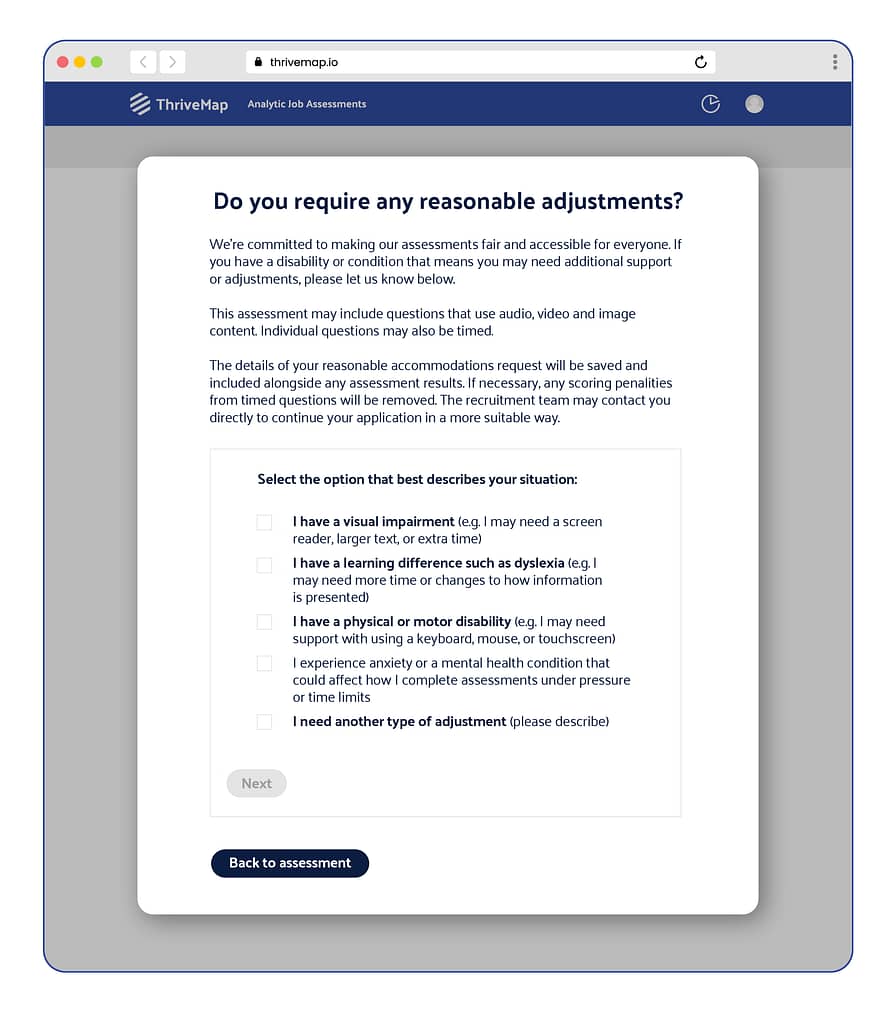
ThriveMap’s latest update introduces an intuitive way for candidates to request reasonable adjustments directly within the assessment process. Whether it’s additional time, alternative formats, or other accessibility needs, candidates can now select from a short, supportive form tailored to the most common barriers: dyslexia, visual impairment, anxiety, and more.
These needs aren’t just captured; they’re clearly flagged on the recruiter’s report, allowing hiring teams to adapt their approach and remove any time penalties or unfair scoring biases.
An optional graphic prompt shows the impact: the assessment dashboard updates in real time, helping recruiters make informed, compassionate decisions. It’s a small interaction with a big message: you are seen, and you are supported.
Why this matters
Hiring assessments are often positioned as “objective”, but objectivity is meaningless without accessibility. Many platforms today still treat all candidates the same, assuming that equality is synonymous with fairness.
But as disability advocates know, fairness means meeting people where they are, not pretending we’re all starting from the same place.
ThriveMap’s assessments already support a range of candidate experiences – including visual and audio formats, clear and uncluttered UI, and mobile-friendly interfaces. This new feature builds on that foundation, making it easier than ever for candidates to take part fully and confidently.
“Too many candidates are self-eliminating from roles they’re perfectly capable of succeeding in, simply because the process wasn’t built with them in mind,” says Platts. “We wanted to fix that.”
A new standard in assessment
The addition of reasonable adjustments isn’t just a ‘nice to have’ – it’s becoming a baseline expectation. Inclusive assessment practices are not only better for candidates but also better for business.
According to the UK government, employers who embrace inclusive practices see 28% higher revenue per employee and improved staff retention(https://www.accenture.com/content/dam/accenture/final/a-com-migration/pdf/pdf-89/accenture-disability-inclusion-research-report.pdf). Accessible assessments widen the talent pool, improve candidate experience, and reinforce employer brand.
Yet, despite these benefits, only a small fraction of recruitment tools actively support custom adjustments. ThriveMap is proud to be among the first assessment providers to not just talk about inclusivity, but build it into the core of the product.
What’s next?
As hiring continues to evolve, tools like ThriveMap are leading the charge toward a more human, more accessible future. Reasonable adjustments shouldn’t be an afterthought – they should be a default option.
By creating space for transparency, flexibility and fairness, ThriveMap’s new feature helps employers unlock the true potential of every candidate.
Want to learn more? Explore how ThriveMap’s assessments help your team hire fairly, inclusively and confidently – right from the start.
Subscribe for insights, debunks and what amounts to a free, up-to-date recruitment toolkit.
About ThriveMap
ThriveMap creates customised assessments for high volume roles, which take candidates through an online “day in the life” experience of work in your company. Our assessments have been proven to reduce staff turnover, reduce time to hire, and improve quality of hire.
Not sure what type of assessment is right for your business? Read our guide.
Other articles you might be interested in
Principles and best practices for pre hire assessment design
A pre hire assessment can look sophisticated, feel engaging and process thousands of candidates without measuring anything especially useful. The quality of an assessment is not determined by how impressive the technology appears or how many question formats it contains. It depends on whether the assessment measures capabilities that genuinely matter in the job, produces […]
The AI Doom Loop: Why automated hiring is screening out the people you actually want
Job applications grew four times faster than job openings in the first half of 2024 alone, and that gap has only widened since. Gartner projects that by 2028, one in four job candidates globally will be fake: AI-generated profiles with fabricated resumes, cloned voices, and deepfaked video sitting through interviews that were never a real […]
Want to assess attention to detail in your hiring process? Here’s how to ensure you hire the right person
Attention to detail is one of the most commonly assessed skills in recruitment, and for good reason. In many roles, the ability to spot errors, follow processes and work accurately has a direct impact on quality, compliance and customer outcomes. So it makes sense that employers invest in attention to detail tests. The problem is […]