Steps in the candidate selection process: 4 examples you can use.
6 minute read
Posted by Emily Hill on 4 February 2026
The modern candidate selection process is having an identity crisis.
On one side, speed. Automation. One-click apply. AI screening. Funnels that look more like e-commerce checkout flows than human decisions.
On the other, reality: real jobs, real people, and real consequences when a hire goes wrong.
Hiring teams are under pressure to move faster than ever. Candidates are under pressure to compete in systems they barely understand. Somewhere in the middle, the process itself has started to feel less like a conversation and more like a machine.
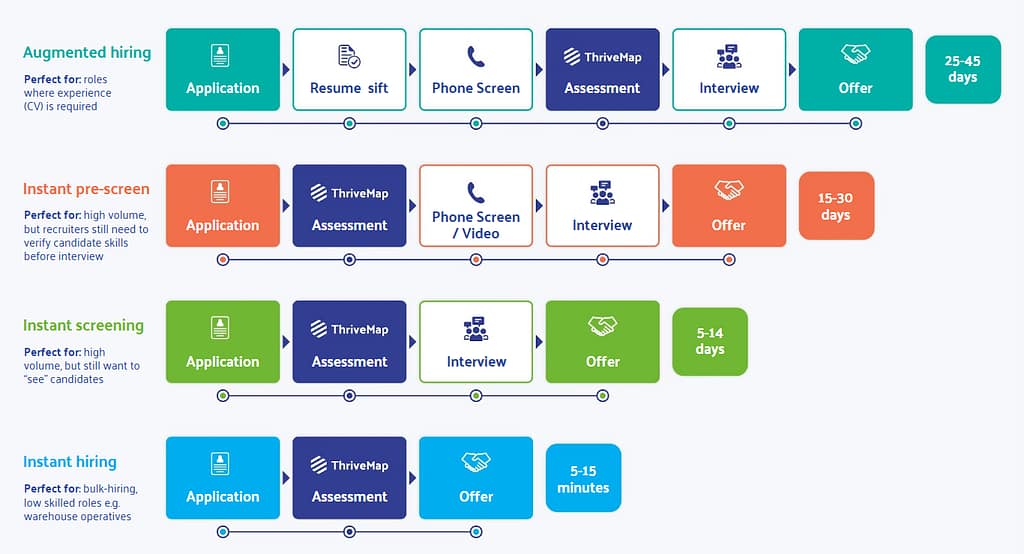
This article walks through the four different types of candidate selection processes, when to use each, and example benchmarks.
Should we just use one-click apply?
One-click apply feels like progress.
For candidates, it removes friction. No long forms. No cover letters. No portals that forget your password every time you log in. Just press a button, move on with your day.
For employers, it promises volume. More applicants, faster pipelines, fuller shortlists.
But there’s a quiet side effect most hiring teams don’t see until later.
What candidates think is happening
When a process starts with one click and ends in silence, candidates don’t imagine a recruiter thoughtfully reviewing their experience. They imagine a system.
A bot. An algorithm. A keyword filter.
So they adapt.
They start writing for machines instead of humans:
Stuffing CVs with job description keywords
Copying skills lists from role profiles
Formatting for ATS parsing instead of clarity
This doesn’t just distort hiring data. It changes how people feel about applying.
For many candidates, especially early-career or frontline workers, it reinforces the idea that they’re disposable, invisible, and competing in a system that isn’t really designed to see them.
From a brand perspective, that’s a leak in your employer reputation. From a human perspective, it’s a process that teaches people to perform rather than understand.
We’re not against one-click apply, we just believe it should be paired with a clear, human step that shows candidates what the job really involves, not just whether their CV matches a system’s rules.
The alternative: Screening as a two-way process
Here’s the mental shift that changes everything:
Candidate selection isn’t just about filtering people out. It’s about helping the right people opt in.
With ThriveMap, candidates aren’t screened by a fixed, invisible system. They’re screened through a process you design, one that reflects the reality of the role, the volume you’re hiring at, and how much human interaction makes sense at each stage.
The assessment doesn’t sit at the end as a test. It sits inside the flow as a window into the job itself.
Let’s walk through the four different candidate selection process examples and what actually happens in each one.
1. Instant pre-screen
Best for high-volume hiring where recruiters still want a human check before interview
Typical timeline: 15–30 days
This flips the order.
Instead of screening after humans get involved, candidates experience the job before a recruiter invests time.
Step-by-step flow:
Application Simple entry point. Low friction.
ThriveMap assessment Candidates immediately step into a realistic preview of the role. They see what the job actually looks like in practice, not just in an ad.
Phone or video screen Recruiters now talk to a smaller, more aligned pool — people who’ve already demonstrated interest and understanding.
Interview Deeper evaluation, less basic explanation.
Offer
What instant pre-screen solves
This model cuts down on wasted recruiter time and candidate disappointment. Fewer people reach interview only to discover the job isn’t what they thought they signed up for.
2. Instant screening
Best for high-volume roles where you still want a human touch
Typical timeline: 5–14 days
This is speed with structure.
Step-by-step flow:
Application
ThriveMap assessment This becomes the main screening layer by surfacing candidates who show realistic alignment.
Interview / assessment day Short, focused, and practical. No need to explain the basics — the candidate already knows what they’re walking into.
Offer
What this solves
This model is powerful in fast-moving environments, retail, operations, customer service, where time-to-hire matters, but so does cultural and role fit. It also reduces the number of no-shows if combined with an assessment day.
3. Instant hiring
Best for bulk hiring and frontline roles
Typical timeline: 5–15 minutes
This is the extreme end of the spectrum, but when done properly, it builds trust and brand preference.
Step-by-step flow:
Application
ThriveMap assessment
Offer
That’s it.
No interviews. No waiting. No guessing.
What instant hiring solves
Implementing an instant hiring model makes sense in high-volume, hard-to-fill, and frontline roles where speed and scale matter more than traditional precision. It’s commonly used in warehouse operations, logistics, seasonal retail, manufacturing, and shift-based work, especially when employers are hiring against fixed start dates or large onboarding waves.
In these environments, the aim is to ensure candidates understand the realities of the job before they accept.
This is where ThriveMap becomes the filter. The assessment surfaces shift patterns, physical demands, pace, and performance expectations, allowing candidates to self-select in or out before an offer is made.
The result is faster time-to-hire, reduced recruiter workload, and fewer people who leave angry, surprised or misled.
4. Augmented hiring
Best for roles where experience is required or graduate schemes
Typical timeline: 25–45 days
This is the most familiar, “classic” hiring model, but with a modern layer added.
Step-by-step flow:
Application The candidate applies, usually with a CV. This stage still matters because prior experience, qualifications, or industry background are part of the decision.
Resume sift Recruiters review CVs for role fit, progression, and baseline requirements. This is human judgment, not just keyword matching.
Phone Screen A short conversation to validate interest, availability, salary expectations, and high-level fit.
ThriveMap Assessment This is where the process changes tone. Instead of a generic test, candidates experience the realities of the role:
What a typical day looks likeThe pace, pressure, and prioritiesThe trade-offs of the job, not just the benefits
At this point, some candidates self-select out because they realise the role isn’t what they expected.
Interview / Assessment centre Now the conversation is better. Candidates arrive informed, grounded, and asking smarter questions.
Offer Fewer surprises. Fewer dropouts. Fewer early exits.
What this solves
This model reduces the classic “great on paper, gone in three months” problem. The assessment doesn’t replace human judgment, it augments it with realism.
Why this transforms the hiring process
Traditional screening feels like:
“Convince us you’re good enough.”
Assessment-first hiring feels like:
“Here’s what the job is really like. Decide if this is for you.”
Subscribe for insights, debunks and what amounts to a free, up-to-date recruitment toolkit.
About ThriveMap
ThriveMap creates customised assessments for high volume roles, which take candidates through an online “day in the life” experience of work in your company. Our assessments have been proven to reduce staff turnover, reduce time to hire, and improve quality of hire.
Not sure what type of assessment is right for your business? Read our guide.
Other articles you might be interested in
Traditional vs Realistic Recruitment
Most hiring teams are under pressure to improve time-to-fill.That makes sense, open roles create real operational pain. But speed doesn’t tell you whether the person who accepted the role will still be there in three weeks. And when candidates aren’t a good fit, it shows through early attrition, retraining costs, frustrated managers, and leadership asking: […]
How to build remote work culture More than half of employers now offer remote work. Yet over a third are actively pulling people back to the office, citing drops in productivity and culture. The problem isn’t location. It’s design. Most companies are still running office-era systems in a work model that no longer has an […]
The Candidate Expectation Gap: Why Filtering Faster Is Not the Same as Hiring Better
Why Most Hiring Systems Measure the Wrong Things Modern hiring processes are built to move people through a funnel. Applications in. Screens out. Interviews. Offer. Start date. Most of the metrics that define success sit at the top of that funnel. Speed to hire. Time to shortlist. Cost per hire. Interview to offer ratio. Those […]